

No Problem – Use Python’s SciPy Module Instead
pectrum analyzers are used to capture the amplitudes and frequencies of time-domain signals, plotting these signals horizontally across a display, with lower frequencies on the left and higher frequencies on the right. Spectrum analyzers operate on the principle of the Fast-Fourier Transform (FFT) algorithm and have many important uses in compliance engineering, including noise analysis of measurement systems.
A measurement system could be a circuit that measures voltage or current using an analog-to-digital converter (ADC) that outputs ADC counts that represent the time-domain signal captured by the system. In such systems, it is important to determine how much unwanted noise is in the system as this noise could negatively impact the accuracy of the measurement system because the unwanted noise could mask the wanted signal.
A spectrum analyzer is a useful tool for hunting down unwanted noise in a measurement system. But what if, for whatever reason, you didn’t have a spectrum analyzer at your disposal? Not determining the noise characteristics of your system is not an option, so what else could you do to determine how much noise was in your measurement system? Well, if you had a way to capture the output of the ADC, for instance, then you could use the Python programming language, and its SciPy FFT module to analyze this data. Since it’s a little tricky getting the SciPy FFT function to give you the correct output (you can’t just plop your measurement data into the FFT module and expect it to work correctly), you’ll want to have a rudimentary understanding of how to use Python as a pseudo-spectrum analyzer. If you’re interested in learning how to do this, read on. The following is provided to get you started using the SciPy FFT function as a replacement for a spectrum analyzer.
import numpy as np
import matplotlib.pyplot as plt
from scipy.fft import fft
If you don’t already have these modules installed as part of your Python environment, you must install them using the PIP command first. See reference one for how to install Python modules using the PIP command.
# Perform FFT using SciPy Module
################## Steps ##################
# 1: Construct Time Domain Signal
# 2: Perform FFT using SciPy ‘fft’ Function
# 3: Plot Frequency of Spectrum using matplotlib
##########################################
Note: As a personal preference I like over-documenting the code I write. I think that if I put the time into figuring out how to code something, then I don’t want to spend a lot of time re-learning it six months down the road when I may have forgotten what I was originally doing. Some might consider my over-commenting as unprofessional. My boss and other users of the code I write most likely appreciate the speed at which I get my coding work done.
# Perform FFT using SciPy Module
############### Steps ###############
# 1: Construct Time Domain Signal
# 2: Perform FFT using SciPy ‘fft’ Function
# 3: Plot Frequency of Spectrum using matplotlib
####################################
Note: As a personal preference I like over-documenting the code I write. I think that if I put the time into figuring out how to code something, then I don’t want to spend a lot of time re-learning it six months down the road when I may have forgotten what I was originally doing. Some might consider my over-commenting as unprofessional. My boss and other users of the code I write most likely appreciate the speed at which I get my coding work done.
Note: Once the script works correctly, you can play around with the signals you want to inject. Instead of just injecting a 1 V, 60 Hz and 0.5 V DC as the steps below show, try something like the following and see what the script outputs:
y = 1 * np.sin(2 * np.pi * f0 * t) # Create single time-domain signal, or
y = 1 * np.sin(2 * np.pi * f0 * t) + 4 * np.sin(2 * np.pi * 3 * f0 * t) # Time-domain signal plus a second signal, or
y = 1 * np.sin(2 * np.pi * f0 * t) + 4 * np.sin(2 * np.pi * 3 * f0 * t) + 2 # Time-domain signal plus a second signal plus DC signal (0 frequency) of amplitude equal to 2, etc.
The possibilities are endless!
Fs = 1000 # Sampling frequency (Hz). Can reconstruct signal to half of this frequency (Nyquist Sampling Theorem).
tstep = 1 / Fs # sample time interval
f0 = 60 # input signal frequency (Hz)
N = int(100 * Fs / f0) # number of samples. Ex.: Use int(10*Fs/F0) to increase number of samples (10 cycles of samples)
t = np.linspace(0, (N-1) * tstep, N) # Create time steps of time domain signal
fstep = Fs / N # freq interval for each frequency bin (sampling frequency divided by number of samples)
f = np.linspace(0, (N-1) * fstep, N) # Create freq steps –> x-axis for frequency spectrum
y = 1 * np.sin(2 * np.pi * f0 * t) + 0.5 # Create a 1 Vpk 60 Hz time domain signal and a 0.5 Vdc signal
X = fft(y) # X is a series of complex numbers
X_mag = np.abs(X)/ N # Magnitude of fft output normalized to number of samples
f_plot = f[0:int(N /2 + 1)] # Only plotting half of sampling frequency (just positive frequencies)
X_mag_plot = 2 * X_mag[0:int(N/2+1)] # Get Magnitude
# Get correct DC Component (does not require multiplication by 2) and does not require taking log.
X_mag_plot[0] = X_mag_plot[0] / 2 # Compute DC
# Step 3: Plot Frequency of Spectrum using matplotlib
fig, [ax1, ax2] = plt.subplots(nrows=2, ncols=1)
fig.set_figheight(8)
fig.set_figwidth(8)
ax1.plot(t, y, ‘-’, lw=0.4, c=’black’)
ax2.plot(f_plot, X_mag_plot, ‘-’, lw=0.4, c=’black’)
ax1.set_title(‘Sinusoidal Signal’)
ax2.set_title(‘Magnitude of Spectrum’)
ax1.set_xlabel(‘Time(s)’)
ax1.set_ylabel(‘Count(s)’)
ax1.minorticks_on()
ax2.set_xlabel(‘Frequency (Hz)’)
ax2.set_ylabel(‘Amplitude (pk)’)
ax1.grid()
ax2.grid()
ax1.set_xlim(0, t[-1])
ax2.set_xlim(0, f_plot[-1])
plt.tight_layout()
plt.show()
The plots in Figure 1 show the time-domain on the top and the frequency-domain on the bottom. Notice that the script seems to be working correctly, as it can pick out the 0.5 V DC signal at 0 Hz and the 1 V peak signal at 60 Hz that we injected.
Additionally, the frequency-domain plot above is shown using a linear scale. This is OK for demonstration purposes, but you will want to have the data presented logarithmically (because it’s easier to analyze). It doesn’t take too much head-scratching to figure out how to plot data in Log form with Python.

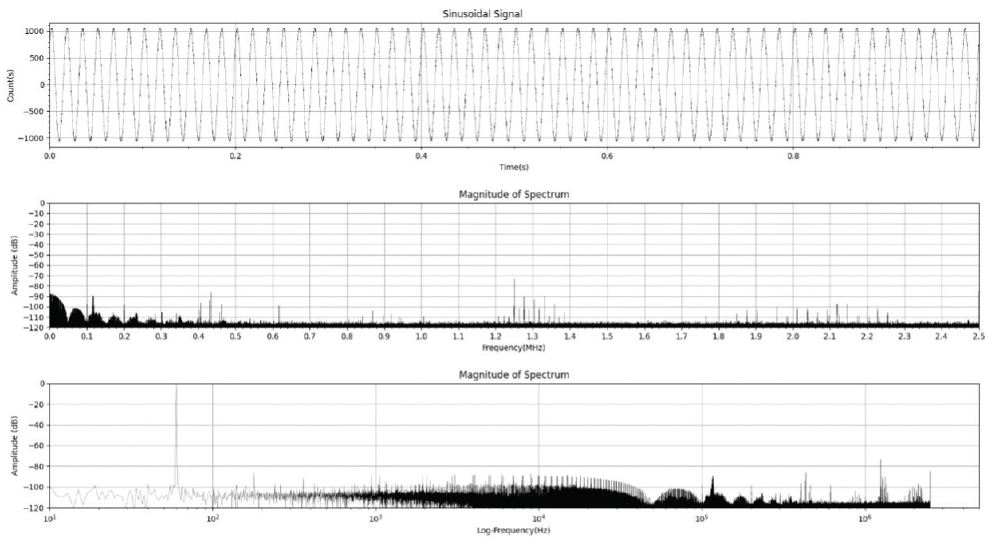
Also note that there is one downside to using Python’s SciPy module as a pseudo-spectrum analyzer that wasn’t addressed above. A spectrum analyzer captures data in near real-time, whereas with Python, the data is analyzed on a one-shot basis after the fact. This could result in not capturing spurious noise intermittently, before or after the signal data was initially captured. Certainly not a showstopper, just something to be aware of.
In short, the above code should give you enough to develop your own Python FFT script. Have some fun and play around with it!
- Sweigart, A., Automate the Boring Stuff with Python – Practical Programming for Total Beginners, 2nd Edition, No Starch Press, 2020.
- Kong, Q., Siauw, T., Bayen, A.M., Python Programming and Numerical Methods – A Guide for Engineers and Scientists, Academic Press, 2021.